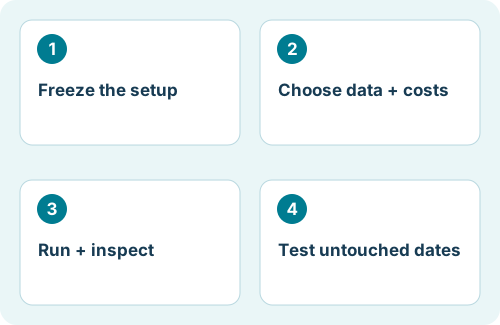
Prepare a reproducible test
Use the same MT4 EA build you intend to evaluate. Confirm it is installed and visible in Navigator. Open View → Strategy Tester, or press Ctrl+R in the Windows desktop terminal. If the EA is missing, confirm that you used this terminal’s data folder and the MT4 executable.
Create a test record before starting. Write down the terminal build, EA version, broker server, complete symbol name, timeframe, dates, starting deposit, account currency, spread, and preset filename. Preserve the original preset instead of overwriting it while experimenting.
State a question that the test can answer: for example, whether the strategy opens and manages trades as documented during a volatile period. “Find settings that make the largest historical profit” is a different exercise and demands separate validation.
Configure the Strategy Tester
- Select the Expert Advisor and the broker’s exact Symbol, including any suffix.
- Choose Period for the strategy’s timeframe. Enable Use date and set the evaluation window.
- Select the modeling mode. For intrabar management, start with Every tick and inspect data coverage.
- Set an explicit Spread when comparing runs. “Current” can make the assumptions depend on when you start testing.
- Open Expert properties. Set deposit/currency and trade direction in Testing, then load or enter the EA’s Inputs.
- Leave Optimization off for the baseline. Use Visual mode for a short behavior check, then run the longer test.
In Inputs, a single test uses the Value column. Start, Step, and Stop are optimization ranges; changing them alone does not change your baseline test.
Understand MT4 modeling limits
The standard MT4 Every tick mode generates a price path using available lower-timeframe data; its name does not mean you have a complete archive of actual historical ticks. Open prices only is appropriate only when the strategy’s behavior genuinely fits that simplified model. Control points is a coarse approximation.
Check the requested dates against the history actually used. Missing lower-timeframe data and mismatched history can invalidate the comparison. A modeling-quality percentage describes part of the test construction; it is not a probability that the EA will succeed.
Spread: points are not always pips
For a common five-decimal EURUSD quote, one point is 0.00001 and one pip is 0.00010. Under that convention, a 20-point spread is 2 pips. Check the symbol specification rather than transferring that conversion to metals, indices, or every other instrument.
| Illustrative EURUSD test | Spread in points | Spread in pips |
|---|---|---|
| Lower-cost scenario | 10 | 1.0 |
| Baseline scenario | 20 | 2.0 |
| Higher-cost scenario | 30 | 3.0 |
These are example scenarios, not recommended broker costs. Repeat the same frozen setup across plausible costs and inspect commission and swap treatment in the output. A strategy that depends on a narrow cost assumption needs closer scrutiny. A fixed-spread test also cannot reproduce every historical spread spike.
Read the report beyond net profit
Inspect Results for trade sequence, Graph for the account path, Report for summary statistics, and Journal for errors. Save the report and matching inputs together. Check trade count, drawdown, largest losses, holding times, and whether trading stops unexpectedly.
For basket or grid-style behavior, individual profitable closes can hide exposure that accumulated before closure. Examine floating losses and open trades where the available report or visual test allows it. If the evidence does not capture the risk you need to measure, acknowledge that gap instead of using balance profit as a substitute.
Investigate an unusually strong run: did one trade account for most of the gain? Did the test begin just after a difficult period? Did a filter silently disable a feature? These questions produce a more useful report than a screenshot of the final balance.
Validate without selecting the answer in advance
Keep a later historical period out of parameter selection. Once the candidate settings are frozen, test that untouched window. If you change settings after seeing its result, it is no longer a clean holdout for that revised strategy.
Then run a real-time demo forward test. For Flex EA, verify whether the selected strategy’s virtual-trade logic, external dependencies, and filters are supported by the tester in your installed release. Use the developer’s instructions for test-specific inputs; do not invent substitute settings or disable protective filters just to obtain a trade.
What if the backtest produces zero trades?
Start with Journal, data coverage, initialization, and symbol/timeframe compatibility. A quiet period can also be consistent with the entry rules. The troubleshooting guide below walks through those checks.
References and scope
Platform mechanics are documented in the official MetaQuotes references below. The workflow, checklists, and examples are editorial guidance. Menus and available features may vary by terminal build and broker. Flex-specific notes refer to the product homepage; consult your installed release’s member documentation for exact inputs.