Separate three different experiments
| Test | Data | Main question |
|---|---|---|
| Backtest | Past market data | What does this implementation do under these historical assumptions? |
| Historical out-of-sample test | Past data held out from parameter selection | Does the chosen setup behave similarly on an untouched interval? |
| Real-time demo forward test | New quotes arriving as time passes | Does the deployed EA operate as expected with this broker, terminal, and hosting setup? |
MT5 also calls its historical holdout feature “Forward.” That tester feature is not the same as running a demo account for the next several weeks. Label reports clearly so readers know which evidence they are seeing.
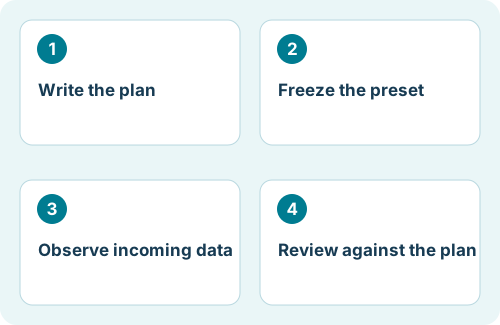
Write the plan before the first trade
Use a fresh demo account where practical, so earlier trades do not contaminate the record. Choose an account type, currency, leverage, and starting balance that make sense for the setup you are evaluating. An unusually large demo balance can hide margin pressure that would matter on a smaller account.
Record the EA version, preset, broker server, platform build, symbols, timeframes, hosting environment, and trading permissions. Decide how you will respond to connection failures and unexpected exposure. Define operational stop/review conditions before the test begins.
Choose both an observation period and an evidence requirement. There is no universal number of weeks or trades that proves an EA is reliable. A low-frequency strategy may produce very little evidence in a month. Twenty positions opened as part of one basket are also not twenty independent market situations.
Freeze settings and keep an observation log
Save the preset with a dated name and retain the original. Avoid switching strategies after each losing trade. If a genuine configuration mistake requires a change, record it, give the setup a new version, and evaluate the new segment separately.
| Log field | Example entry—not a trading recommendation |
|---|---|
| Test ID | Demo-A / preset-v1 / EA-build-recorded |
| Daily operating check | Terminal connected; correct account; no initialization errors |
| Trade or basket reference | Broker ticket IDs and strategy identifier |
| Context | Broker time, symbol, spread observed, active filters |
| Exposure and outcome | Open positions, floating P/L, closed P/L, margin observations |
| Incident or change | Restart at recorded time; no preset change |
Keep account credentials out of shared logs. Save reports and relevant Experts/Journal excerpts. If you publish the test, identify it as demo, specify the dates, and describe changes rather than presenting an uninterrupted record when the setup was altered.
Measure equity as well as closed profit
Balance reflects closed transactions; equity also includes the current value of open positions. A smooth balance line can coexist with substantial floating losses. Monitor the open exposure during the test rather than relying only on the final closed-trade report.
In this hypothetical snapshot, a $10,000 starting account has a $10,200 balance but only $9,100 equity. The open loss is $1,100. From the stated $10,000 starting reference, equity is down 9%; that is not necessarily the account’s maximum peak-to-trough drawdown. Define the reference and sampling method when reporting drawdown.
Also record duration of drawdowns, simultaneous positions, margin usage, and concentration in related currency pairs. If the platform report does not capture intraday equity extremes, say so; an end-of-day log may miss them.
Compare behavior, not just totals
Ask whether trade timing, holding periods, order size, and exit logic are consistent with the documented strategy. Check whether no-trade periods can be explained by filters or entry conditions. Investigate technical differences before concluding that the strategy changed.
A demo environment does not reproduce every live execution condition. Fills, liquidity, costs, and restrictions may differ. A successful demo test is evidence about that demo setup, not a promise that the same results will occur with real money.
If the test reaches a predefined review threshold, preserve the evidence and evaluate it. Disabling new entries may still leave open trades needing management; know how the EA handles that situation before the experiment starts.
Finish with a decision record
- Was the EA operational for the intended observation window?
- Were there enough distinct trading situations to draw even a tentative conclusion?
- Did the frozen setup stay within the limits defined for this experiment?
- Were losses and technical incidents explained and documented?
- What uncertainty remains, and what additional test would address it?
For Flex EA, keep the selected strategy, virtual-trade-related inputs, and filters documented. A preset update is a new experimental condition. Do not combine its results with the previous version without showing the change.
You may decide to continue testing, reject the setup, or investigate a specific limitation. None of those decisions requires assuming that a profitable historical or demo period establishes future profitability.
References and scope
Platform mechanics are documented in the official MetaQuotes references below. The workflow, checklists, and examples are editorial guidance. Menus and available features may vary by terminal build and broker. Flex-specific notes refer to the product homepage; consult your installed release’s member documentation for exact inputs.